

Michigan business entity search is the lookup that sits behind every vendor check, lease application, and filing confirmation in the state. LARA’s Corporations Division keeps the index, and the portal publishes it. A record carries the name, the state number, the class, the condition, the office, the agent, and every document on file.
This page concentrates on the search itself: the routes into the index, the fields each result carries, the reasons a query can fail, and the point at which a reader needs a different office. It is written for a buyer who has a company name, a founder who has a receipt, and a researcher who needs a record that a directory site only summarizes.
How the Michigan Entity Search Works
The portal presents one search box with a short set of filters. A reader types a name or a number, chooses an entity type if the list is long, and opens the record from the result. Anyone who needs the wider index can begin at Michigan Business Entity Search on the home page and open the company from there. The system searches the current index rather than a historical archive, so a name that was changed last month returns the new record. No account is needed, and the lookup itself costs nothing.
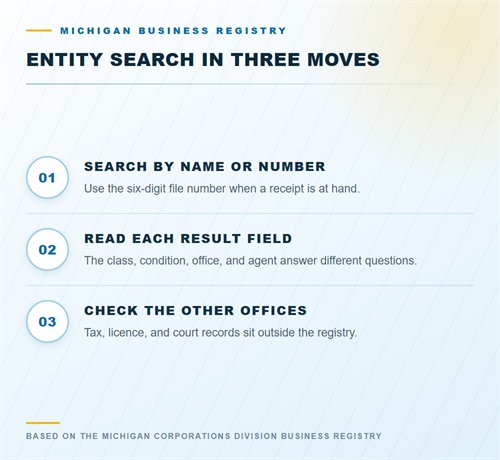
The page is built for a reader who arrives with a question rather than a file number. A buyer usually has a trading name, a founder usually has a receipt, and a researcher may have only a document signed years ago. Each of those readers needs a different first field, and the record is arranged so that the name, the number, and the address can be checked in any order. Start with whatever is certain, then confirm the rest against the record.
Search by Name
Enter the distinctive word and leave the ending out. The comparison ignores the ending, so a single word can return several classes in one list. A full name with punctuation can return fewer results than the shorter query, because the index treats commas, periods, and ampersands unevenly.
Search by Identification Number
The six-digit file number is the fastest route when a receipt or a certificate is at hand. Paste the number without spaces and the record opens directly. A federal employer number is not the same identifier, and the portal does not use it as its primary key, so a reader holding only an EIN should start with the legal name. The file number never changes, which makes it the stable reference for a file.
Filters and Result Order
The filter for entity type removes the partnerships and the nonprofits from a long list, and the status filter removes the closed records. Those filters work after a name query, not instead of one, so a reader should always search first and narrow second, and the status filter clears the closed files. The list is not ranked by relevance, and the first result is not the best match. Sort by status, then by formation date, before opening a record.
Michigan entity index:
https://www.michigan.gov/corpfileonline
What the Search Returns
A result is a charter record rather than a business profile. It reports the name, the type, the identifier, the status, and the addresses the entity declared, along with the documents it has filed. It does not report revenue, employees, credit, or reputation. The file settles three questions: does the company exist, who receives service, and what has been submitted.
Identity Fields
The legal name, the entity type, and the file number sit at the top of the record. Those three fields identify the file, and a reader should copy all three into any note. A name alone is ambiguous when several entities share a word, and the file number removes the doubt. The entity type also tells you which report schedule applies and which documents a buyer should request.
Status Field
The status reports whether the registration is in force. An active entity is current, while a company that misses two statements drops out of good standing by statute. A dissolved or cancelled record shows the closure. The field is a point in time, so a printout from last year may describe a condition that no longer holds. Check the date beside the status before you rely on it.
Address Fields
Service goes to a physical Michigan address, and the agent receives it there. A mailing address, where the division shows one, is separate from the office and does not control service. The three fields are often confused, and a notice sent to the wrong one can leave a business without knowledge of a suit. Read the label on each field before sending anything.
Entity Type in the Result
The type field changes how the rest of the record should be read. A limited liability company, a corporation, a limited partnership, and a limited liability partnership each follow a different statute, and each files a different set of documents. The search result shows the type before the record opens, which lets a reader choose the right page on this site for the detail.
A type mismatch is a warning sign in a contract. A supplier that describes itself as a corporation while the registry shows an LLC has either changed its structure or described itself inaccurately, and either fact belongs in the file. The same applies to a nonprofit that presents itself as a profit company, or a foreign entity that has not registered in Michigan at all. The type field is short, and it settles those questions at once.
Limited Liability Companies
A Michigan LLC is formed by filing Articles of Organization and pays an annual statement each February. The record shows the resident agent, the registered office, and the statement history. A professional LLC adds a report that lists the licensed members, and its statement carries a higher charge. The Michigan LLC records page covers the fields in detail.
Corporations
A profit corporation files Articles of Incorporation, and a nonprofit files a shorter version with its own charge. The corporate record shows the purpose, the authorized shares where relevant, the resident agent, and the annual report history. Directors and officers are reported through the annual filings, and the public index exposes only part of that list. A buyer who needs the full board has to ask the corporation for its records.
Partnerships and Trusts
A limited partnership files a certificate, and a limited liability partnership registers an application. Both appear in the same index with their own type labels, and both keep a resident agent. A business trust files a certificate of trust. The search result shows the class, and the record shows the filing history, but the internal agreement stays with the entity rather than the state.
Searching by Identification Number
The identifier route is the one a careful reader uses when a document is available. A formation receipt, an annual statement, or a certificate carries the six-digit number, and the number leads straight to the file. A reader who types a name instead can land on a similarly named entity and never notice the difference, which is the most frequent cause of a wrong conclusion in a vendor check.
File Number
The file number is assigned when the formation document is accepted, and it appears on every later filing. It is six digits with no letter prefix, unlike the identifiers used in some other states. Copy it exactly, including leading zeros, because the search treats the number as a single token. A number with a missing digit returns an empty result rather than a near match.
Federal Employer Number
The federal employer identification number comes from the Internal Revenue Service and is not the state file number. Some commercial databases index both, which leads readers to assume the state search accepts either. The Michigan portal searches its own file number and name fields, so an EIN alone is not enough. Start with the legal name and confirm the record with the file number from a state document.
Why a Name Search Misses a Record
A name query fails for reasons that have nothing to do with the entity’s existence. The name may have changed, the business may trade under an assumed name, or the spelling in a contract may differ from the spelling on the charter. A reader who assumes the record is missing can conclude that a real company is unregistered, which is a costly error in a diligence file.
Punctuation and Spacing
The index stores a name as it was filed, and the search compares the stored characters. A hyphen, an apostrophe, or a double space can change the result. A company filed as “Riverside Builders, L.L.C.” may not surface from a query for “Riverside Builders LLC” if the punctuation differs. Try the distinctive word alone before concluding that the record is absent.
Assumed and Former Names
An assumed name is a separate filing, and a search on the storefront name returns that filing only when the reader looks in the assumed name index. A former legal name stays in the history after an amendment, but the current record carries the new name. A reader who knows only the old name should search the word and open the record whose history mentions the change.
Records That Need a Different Office
The business registry is one of several state systems, and a reader who needs a tax account, a license, or a court file has to leave it. The registry will confirm that an entity exists and that its filings are current, and it stops there. Knowing which office holds the next record saves a wasted request and a wrong conclusion about a business.
A registry record is a starting point for a compliance file, and the file grows when the other offices are checked. A vendor with an active charter, a current sales tax license, and a clean professional credential is a different proposition from one with only the charter. A buyer who stops at the first record may miss a suspension that another office has already posted. Build the list of offices at the start, and work through it before the contract is signed.
Tax Accounts
Sales, use, and withholding accounts sit with the Michigan Department of Treasury. A business can be active in the registry and still lack a sales tax license, and a tax debt does not appear on the charter record. The Treasury runs its own lookup for a taxpayer, and a buyer who needs the tax position should request it from the seller rather than infer it from the registry.
Licenses and Permits
Professional credentials sit with the licensing bureau inside LARA, and food, farm, and environmental permits sit with other departments. Cities and counties issue local licenses and zoning approvals. None of those records appear in the entity index, so a charter plus an active status is not proof that a business may legally operate. The Michigan business registration page lays out the sequence.
Saving and Documenting a Result
A search result is evidence only if the reader records the date and the source. A screenshot helps, and a certificate helps more, because it carries a seal and a statement that a counterparty will accept. The habit of saving the record at the moment of the check answers a question months later, when the status may have changed and the memory of the search has faded.
Name the saved file with the entity and the date rather than with a generic label, so the file can be found when a lender asks for it. A folder that holds the search printout, the certificate, and the filed formation document tells a complete story. A folder that holds only a screenshot leaves the reader to describe what the screenshot was meant to show.
What to Keep
Keep the entity name, the file number, the status, the date of the lookup, and the page address. If the check supports a payment or a contract, add a certificate of good standing or a certified copy of the formation document. A file with those items can be handed to a lender, a lawyer, or an auditor without a second trip to the portal.
When to Order a Certificate
Order a certificate when a counterparty requires a dated document, when a bank opens an account, or when another state needs proof of existence. The order is handled online in a few minutes, and the certificate arrives by email or by mail depending on the route. A printout of the search page is not a certificate, and most institutions will say so at the counter.
Search Fees and Charges
The lookup itself is free, and the charges in the table apply to documents ordered from the division. The amounts come from the Corporations Division fee schedule, and expedited service, where offered, is quoted as an addition. A card payment in the portal is processed at checkout, and a rejected request is not refunded.
| Item | State fee |
|---|---|
| Public entity search | $0 |
| Certificate of status | $10 |
| Certificate of status, LLC | $10 |
| Certificate of fact, single item | $20 |
| Certificate of fact, all documents filed | $50 |
| Certified copy, minimum charge | $16 plus $1 per extra page |
| Rush certificate | 25% of the document fee |
When the Result Looks Wrong
Occasionally a record shows a name the reader does not recognize, an address that has moved, or a status that contradicts a document in hand. The first explanation is usually a stale printout or a search on a similar name. The second is a filing that has not posted yet. The third, which is rare, is a record that belongs to a different entity with a close name.
Work through those explanations in order and write down what you find. A reader who calls the division before checking the acknowledgment from the filing often learns that the document is simply in the queue. A reader who calls after checking can describe the filing date and the confirmation number, which makes the answer faster. A reader who filters by entity type should still scan the unfiltered list once, because a close name can sit in another class and the filter would hide it.
Stale and Pending Records
The portal updates as filings are processed, and a statement filed on the deadline can take a few days to appear. A record that still shows a warning after a statement was filed may simply be waiting in the queue, so check the acknowledgment first. Check the acknowledgment from the filing before assuming the division lost it, and check again after a week before ordering a new filing.
Wrong Entity
A result can belong to another business with a similar name, especially when the query used a broad word. Compare the file number, the registered office, and the formation date with the documents in hand. If the three do not match, the record is not the one you need. Search again with a distinctive word or with the number from a state document.
Frequently Asked Questions
These questions arrive from buyers, founders, and researchers who use the index every week. Each answer points to the field or the office that settles it.
Is the Michigan business entity search free?
Yes. The public index costs nothing and needs no account. Charges begin with certificates, copies, and filings. The lookup is free at any hour, and a reader can view a record without creating a MiLogin account.
Can I search by federal employer number?
The portal searches the state file number and the name. An EIN from a tax document is not a state identifier, so start with the legal name. Add the county when the word is broad, because a large county can return a long list under one name.
Why does a name search return nothing?
The name may have changed, the business may use an assumed name, or the punctuation may differ. Try the distinctive word alone. Check the assumed name index as well, because a trading style sits in a separate filing.
Does the result show the owners?
No. Michigan does not publish a member or shareholder list. The resident agent field is the only person link in most records. A buyer who needs the list should ask the company for the operating agreement or the stock ledger.
How current is the index?
Filings post as the division processes them. A statement filed on the deadline can take a few days to appear on the record. Check the acknowledgment before assuming the division lost the document, then look again after a week.
Can I download a certificate from the search page?
No. A certificate is a separate order with its own charge. The search page shows the record, not a sealed document, so the order is a second task, and the receipt belongs with the file. A bank that asks for a sealed copy will not accept a screenshot of the record.